
Difference: FlowchartPlugin ( vs. 0)
Revision 018 May 2007 - Main.TWikiGuest
FlowchartPluginYou can create flowcharts from textual content on the topic.Example
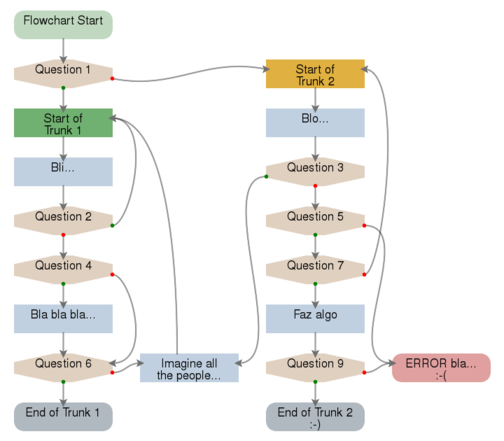
Stop the mouse above each item and see the tag with the name in a bigger size. Each item is a link for the text block what was created it and where can exist more information about this step. The Based SVG ---++ Item of the Flowchart * Id: unic_nome * Type: Question * Yes: item_A * No: item_BTo a better example see the FlowchartPlugin Example. Syntax RulesTo create and present the flowchart, add the variable%FLOWCHART% ou %FLOWCHART{Parameters}%.
This plugin
Plugin collects the content of the text and considers that each heading level two ---++ indicate the beginning of the definition of a new item of the flowchart.
To specify the item and the derived action is expected a list of the type * Attribute: Value
%FLOWCHART_START% and %FLOWCHART_STOP%.
If a name is excessively big for the space of the item a line break can be made with %FLOWCHART_BR%, that does not intervene with the text of the page, only in the flowchart.
To personalize a flowchart, is enough to add parametros to the variable: %FLOWCHART{Parameters}%
The valid parametros are:
Tips The web bowsers normally make cache of the web page and of the elements contained in that (images, animações, sounds...). It is possible that after to save the modification in the definition of the flowchart you do not see the effect of the modification in the image. In this case click "Reload" in your web browser.
Some flowcharts can become so complex and will be difficult to follow its lines. In this case, increase the area of itens, giving a bigger space between them. eg: The web bowsers normally make cache of the web page and of the elements contained in that (images, animações, sounds...). It is possible that after to save the modification in the definition of the flowchart you do not see the effect of the modification in the image. In this case click "Reload" in your web browser.
Some flowcharts can become so complex and will be difficult to follow its lines. In this case, increase the area of itens, giving a bigger space between them. eg: %FLOWCHART{ area-w="220" area-h="100" }%
Construction of the Flowchart and Plugin's Working Way
%FLOWCHART% is saved.
Plugin SettingsPlugin settings are stored as preferences variables. To reference a plugin setting write%<plugin>_<setting>%, i.e. %INTERWIKIPLUGIN_SHORTDESCRIPTION%
Plugin Installation InstructionsNote: You do not need to install anything on the browser to use this plugin. The following instructions are for the administrator who installs the plugin on the server where TWiki is running.
Plugin Info
|
Copyright © by the contributing authors. All material on this collaboration platform is the property of the contributing authors.
Ideas, requests, problems regarding this intranet, Send feedback
Note: Please contribute updates to this topic on TWiki.org at TWiki:TWiki.FlowchartPlugin
Ideas, requests, problems regarding this intranet, Send feedback
Note: Please contribute updates to this topic on TWiki.org at TWiki:TWiki.FlowchartPlugin